How to Restore Vintage Photos Using AI

Old photographs are more than just paper and ink; they are windows into the past, capturing irreplaceable moments in time. However, ageing, environmental exposure, and improper storage can lead to fading, discolouration, and physical damage.
Thanks to AI technology, we can now bring these treasured memories back to life with unprecedented accuracy and ease.
Artificial intelligence has transformed photo restoration, enabling users to repair, enhance, and even colorize vintage images automatically.

The Challenges of Vintage Photo Restoration
Common Issues with Old Photos
Older photographs are highly susceptible to environmental factors such as humidity, heat and air pollution. These factors can lead to physical and chemical degradation, making photos brittle and fading colours. Without proper preservation, some photos may be damaged beyond repair.
- Fading: Caused by prolonged exposure to light and air.
- Scratches and Tears: Result from improper storage, frequent handling, or accidental damage.
- Discoloration: Often due to chemical reactions in photographic paper and ink.
- Dust and Stains: Accumulate over the years, making the image appear dull or unclear.

Traditional Restoration vs. AI-based Restoration
Traditionally, photo restoration required professionals to touch up photos using software such as Photoshop manually. This process is time-consuming and requires specialized skills.
AI-based restoration, on the other hand, uses advanced machine learning to analyze and automatically repair damage in seconds. AI-powered tools can reconstruct missing details, enhance colours, and sharpen images with minimal effort.
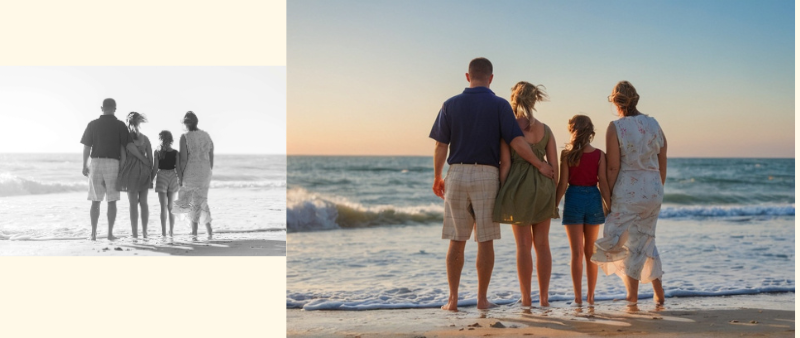
The Science Behind AI Photo Restoration
How AI Detects and Repairs Photo Damage
AI restoration tools utilize deep learning algorithms trained on vast datasets of old and new images. These algorithms analyze patterns, textures, and details to predict and reconstruct missing or damaged parts of a photograph.
Machine Learning and Neural Networks in Restoration
AI models, especially convolutional neural networks (CNNs), identify and remove imperfections such as noise, scratches, and blurs. They also perform colorization by referencing historical data and predicting accurate hues for black-and-white photos.
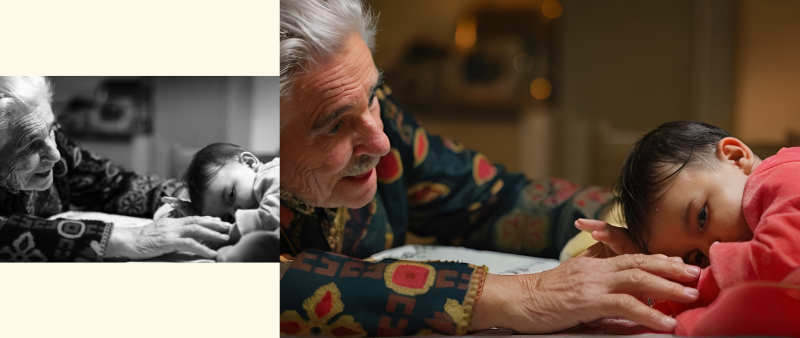
Differences Between AI-Based and Manual Restoration
- Speed: AI tools can restore images in seconds, while manual restoration may take hours or days.
- Accuracy: AI algorithms improve over time, learning from vast datasets to produce more accurate restorations.
- Accessibility: AI-based tools make high-quality restoration available to anyone without requiring professional skills.
Choosing the Right AI Tool for Vintage Photo Restoration
Features to Look for in an AI Photo Restorer
When selecting an AI photo restoration tool, consider these essential features:
- Scratch and noise removal to repair visible damage.
- Colorization capabilities for black-and-white photos.
- Facial enhancement for improving details in portraits.
Imgacolorizer is a multi-functional online AI coloring tool, a one-stop solution for fixing old photos. Photo restoration can be done in just a few clicks, and it also supports free usage. This can be more intuitive for new users who want to see the product's effect before deciding whether to upgrade to a paid plan.

Step-by-Step Guide to Restoring Vintage Photos Using AI
Step 1: Digitizing Your Old Photos (Scanning vs. Photographing)
- Scanning: Best for maximum resolution and detail.
- Photographing: Useful when a scanner is unavailable, but lighting and focus must be carefully managed.
Step 2: Uploading and Preparing Your Image for Imagecolorizer
Go to the homepage of Image Colorizer and click "Start New Colorizer." You will then see a box. Click the yellow button "Add B&W image" to upload the photo you need to colourize.
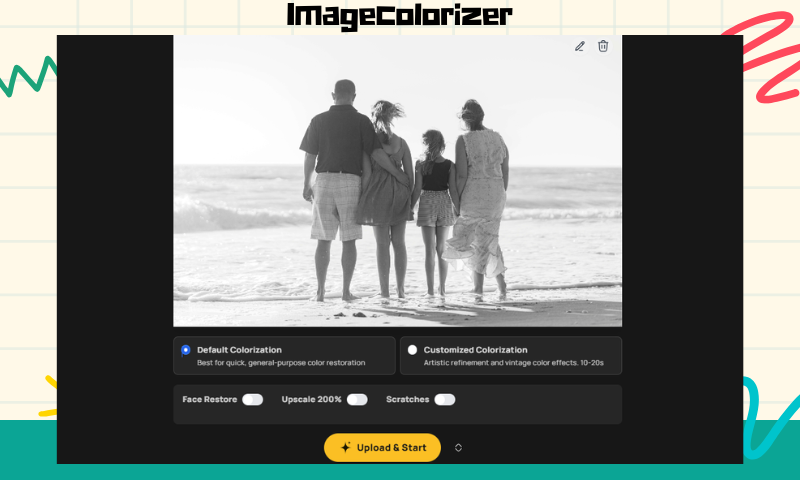
Step 3: Choose the type of coloring
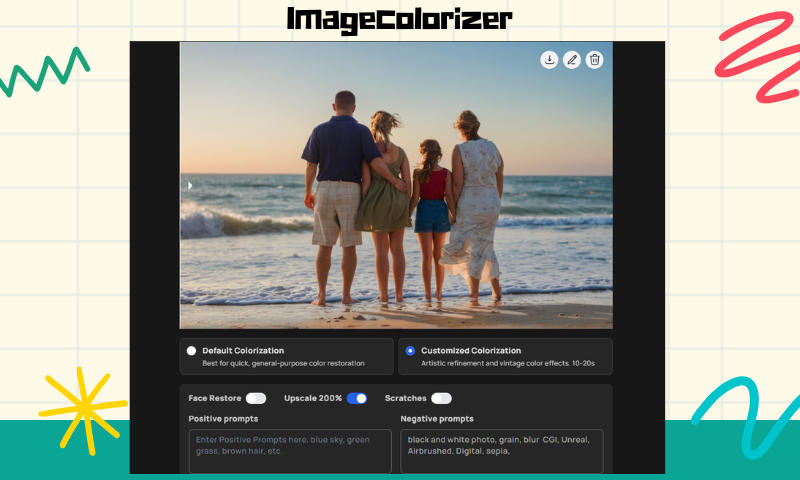
Imagecolorizer provides two types of coloring options. The first one is "Default Colorization" After selecting it, you can determine whether you need the following options: "Face Restore", "Upscale 200%", "Splash", "and "Scratches".
The second one is "Customized Colorization", where you can enter some prompts in addition to other personalization options. You can choose according to your needs and preferences; if you want a more precise effect, you can choose "Customized Colorization".
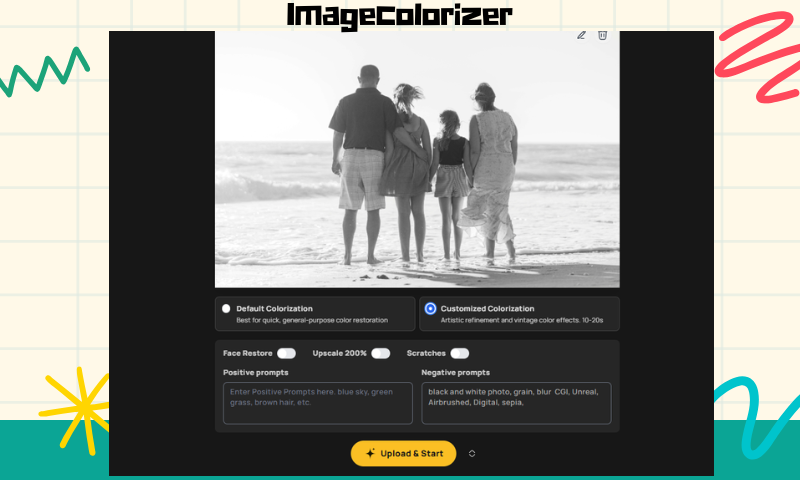
And select "Upscale 200%" to recognize some details more accurately. Click "Upload and Start" to start the program. Click "Upload & Start" to start the process.
Step 4: Edit & Save
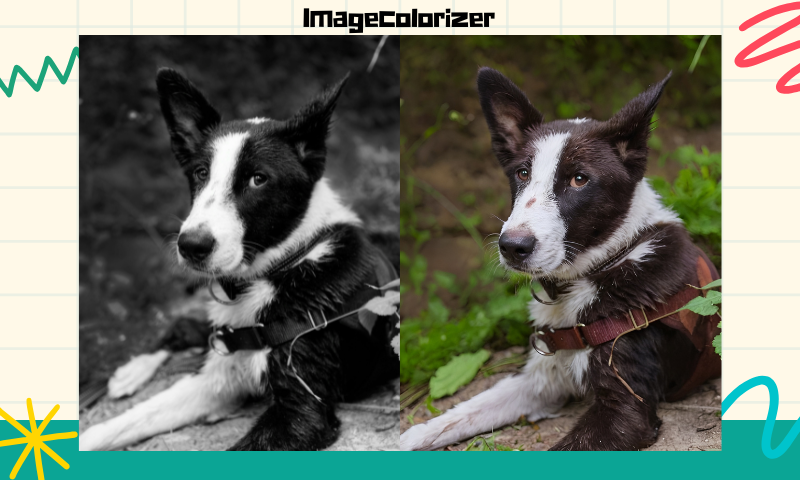
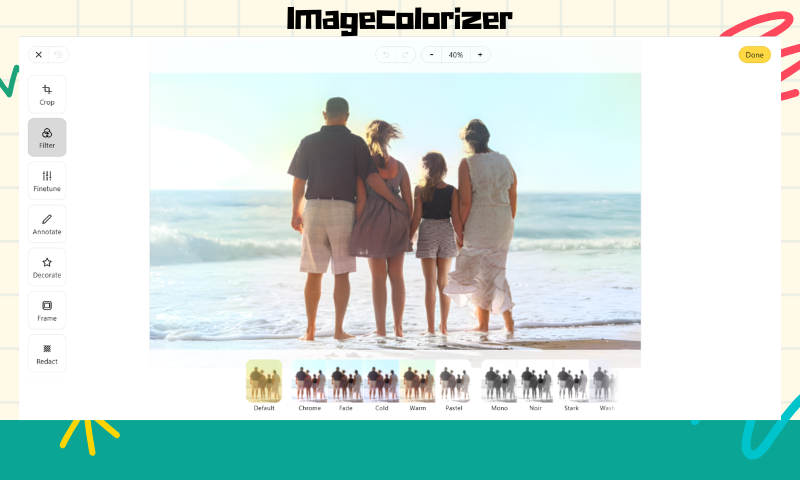
After the processing is completed, you can see the effect of colourization. If you need to crop the picture, adjust its parameters, or perform other operations, you can click the pencil button in the upper right corner of the picture.
Enter the editing mode; when finished, you can click "Done" in the upper right corner to complete the operation. Save the image by clicking the download icon on the image.
Best Practices for Preserving and Archiving Restored Photos
Printing vs. Digital Storage: What's the Best Way to Preserve Photos?
After restoring a photo, it's essential to consider how to store it for long-term preservation. Here are the pros and cons of both physical and digital storage:
- Printing: High-quality prints using archival paper and ink can last for decades if stored properly in acid-free albums or frames.
- Digital Storage: Digital copies ensure images remain intact without physical degradation, making them easier to share and replicate.
For the best preservation, consider a hybrid approach—printing restored images while maintaining high-resolution digital backups.
Cloud Storage and Backup Solutions for Long-Term Protection
Digital photos are vulnerable to data loss due to hardware failures or accidental deletions. To ensure longevity:
- Use cloud storage services like Google Photos, iCloud, or Dropbox for easy access and automatic backup.
- Save multiple copies on external hard drives and USB devices to avoid relying on a single storage method.
- Consider professional archiving platforms that specialize in digital preservation, ensuring your photos are safely stored for generations.

Organizing and Cataloging Your Family's Photo Archive
A well-organized digital archive makes it easier to find and share memories. Best practices include:
- Sorting by date and event to maintain chronological order.
- Adding metadata such as names, locations, and historical notes to each file.
- Creating dedicated folders for different family members, generations, or themes.
- Using photo management software for tagging, searching, and organizing large collections.
By maintaining an organized archive, you ensure your family's history is accessible and well-preserved.

The Emotional Impact of Restoring Vintage Photos
How AI Restoration Helps Reconnect Families with Their Past
Restoring old photos isn't just about image quality—it's about rekindling lost memories. Many families have discovered long-forgotten faces and stories through AI restoration, strengthening emotional bonds across generations.
Preserving Historical and Cultural Heritage Through AI
Beyond personal memories, AI-powered restoration plays a crucial role in preserving historical and cultural heritage. Museums, archives, and historical societies use AI tools to restore and digitize old photographs, ensuring the past remains visible for future generations.
Personal Stories: Before and After AI Restoration Experiences
Many individuals have shared heartwarming experiences after restoring family photos, such as:
- Rediscovering lost family members through enhanced details in faded photos.
- Restoring damaged images of ancestors that were once thought to be beyond repair.
- Seeing a black-and-white childhood photo in color for the first time brings memories to life.
AI restoration can turn blurry or damaged images into clear, vibrant memories, making the past feel more tangible.

Conclusion
Artificial intelligence-driven photo restoration technology has revolutionized the way we preserve our family history, making it easier than ever to repair damage, enhance details, and bring faded images back to life.
There's never been a better time to breathe new life into old photos. Whether you're looking to preserve family history or restore historic images, Imagecolorizer offers a simple and effective way to keep your memories alive for generations to come.
Start your restoration journey today and rediscover the magic hidden in old photos!